
Watch on YouTube: https://youtu.be/Zkd4pj-uz5A
The biggest challenge for me working with GoHighLevel is that people believe the automation workflow is the way to set up their Meta Conversion API.
If you are using GoHighLevel (GHL) to run your funnels and capture leads, it feels natural to use its built-in automation workflows to send your purchase, schedule, or lead event back to Meta using the Conversion API (CAPI).
It seems simple: a user submits a form, a workflow triggers, and GHL sends a “Lead” event directly to Meta.
But if you are relying on GHL workflows to track your online, real-time website conversions, you are falling into a hidden trap that is actively tanking your Meta Ads performance and wasting your ad budget.
Let’s break down exactly why this happens.
Online vs. Offline Conversions: Knowing the Difference
To understand why GHL struggles here, we first need to look at the two different types of conversions happening in your business:
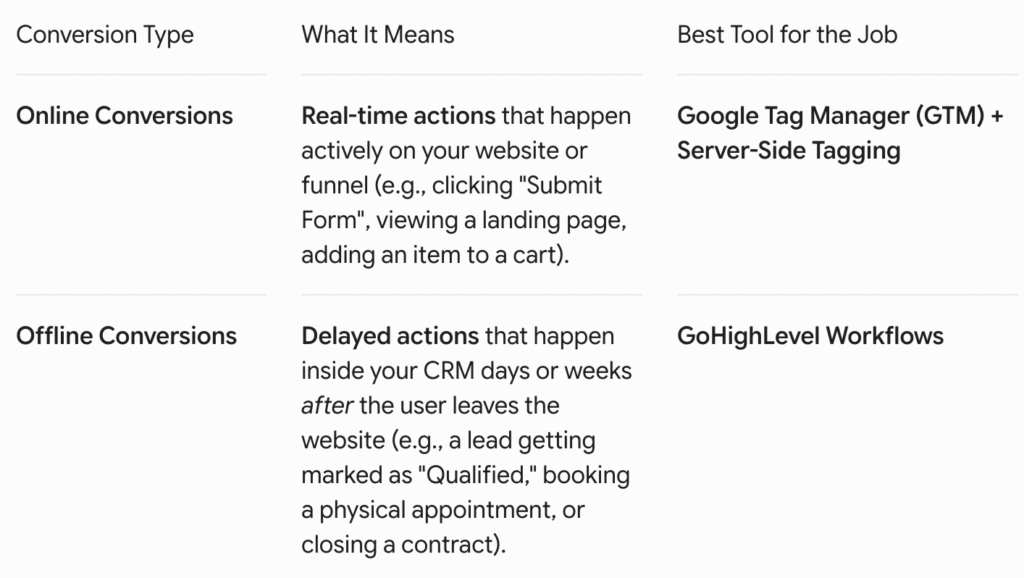
GoHighLevel’s workflow CAPI action was designed from the ground up for offline conversions. It acts just like Zapier, where you can send your CRM sales pipeline back to Meta as standard events such as Purchase to inform a closed deal.
Using it to track live, instant website actions is using the wrong tool for the job.
The GHL Native Meta CAPI Connection
Below is the standard setup inside GHL workflows that many business owners mistakenly use for online conversion tracking:
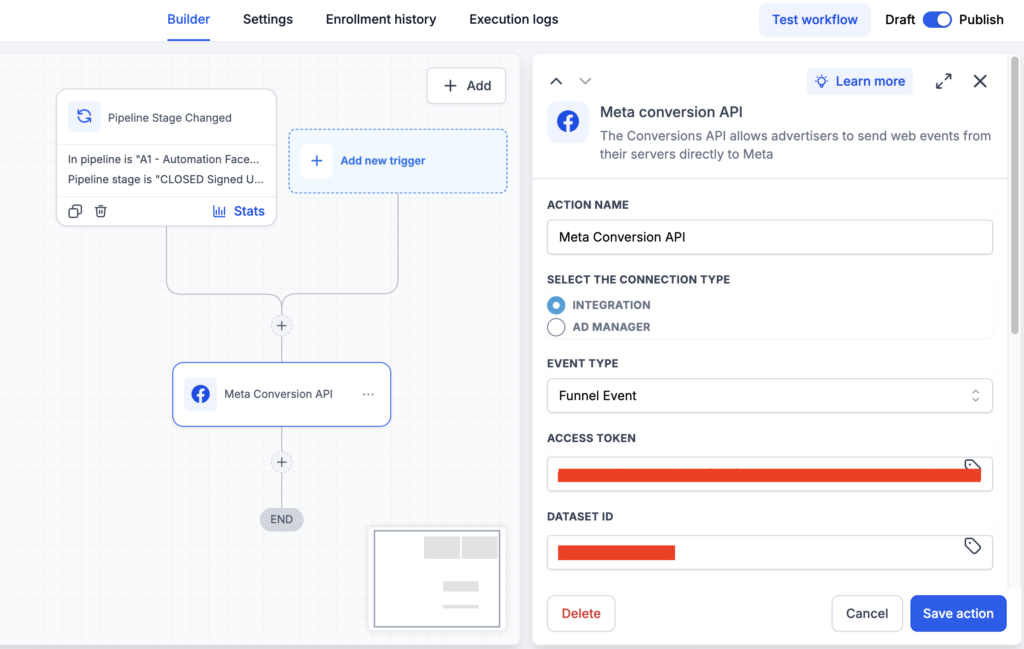
My Recommendation: Do not use this workflow action for real-time online tracking. Save it strictly for offline pipeline updates (like moving a stage to “Closed-Won”).
The 2 Big Flaws Costing You Money
When you force GHL workflows to handle live online tracking, two major technical failures happen behind the scenes.
1. The Deduplication Nightmare (Double-Counting)
To get accurate data, modern advertising uses a “hybrid setup.” This means you track an event through the browser (Meta Pixel) and through the server (CAPI) at the same time.
When Meta receives both, it looks for a unique fingerprint called an Event ID to match them up. If the Event ID matches, Meta says, “Cool, this is the same person, I will delete the duplicate.”
GHL workflows cannot sync a unified Event ID with your browser pixel. Because of this, Meta cannot match the events. The result? Meta either double-counts your conversions (ruining your data) or rejects the server events entirely.
2. Low Event Match Quality (EMQ)
For Meta to know exactly who bought from you, the server needs to send back secure customer matching keys (like an encrypted email, phone number, city, or zip code).
GHL’s automation workflows lack the advanced capability to cleanly package and pass all these real-time browser parameters to Meta. When your Event Match Quality score drops, Meta’s algorithm struggles to find your ideal customers, and your cost-per-acquisition goes up.
What You Should Do Instead (The Golden Standard)
To get a flawless 9+/10 Event Match Quality score and perfect deduplication, you need to separate your tracking infrastructure from your CRM.
Leave GoHighLevel to do what it does best (managing your leads and offline CRM pipelines) and use Google Tag Manager (GTM) combined with Stape to maintain both the Meta Pixel and Conversion API in one place.
Or, you can use the Meta Pixel raw codes in GoHighLevel funnels and use the Conversion API Gateway from Stape or other tools if you want a very simple setup with no technical expertise.
Get in touch.
Drop a line and I'll be in touch. I respond to all legitimate enquiries within 24 hours.